



IMPORTANT!!! You have to download VN Starter Pack:
Download here
This pack have :
- DirectX 9.0c
- Visual C++ ( x64 and x86)
- Locale Emulator
- Textractor Pre-Install (With ATLAS and LEC plugin)
- ChiiTrans Lite
- Power ISO
- Daemon Tools Lite
- AlpharomDIE
- NoRegionLoader
- NTLEAS v0.92 (for old VN)
- A Guide how to use
( OPTION 1 )How to run game.exe using Japanese Locale Emulator and NoRegionLoader
- For Windows 10, Download the file here, then install LEInstaller.exe
- For Windows 7,8,8.1 Download file here, then install pApploc
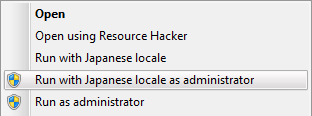
- IF YOU HAVE INSTALLED THOSE PROGRAM, JUST CLICK RIGHT MOUSE GAME.EXE THAT YOU WILL PLAY, THEN CHOOSE RUN AS JAPANESE LOCALE (ADMINISTRATOR)
 |
| Locale Emulator Windows 10 |
| pApploc Windows 7,8,8.1 |


( OPTION 2 ) How can I set Windows 10/Windows 8.1 to Japan/Japanese?
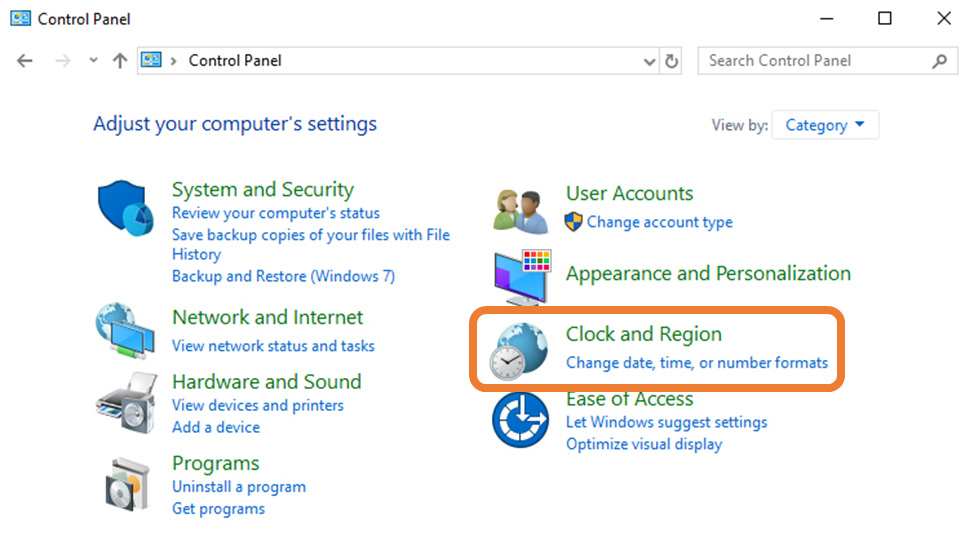
- Press the Windows key, type ‘control panel’ and open the Control Panel.
- Click on Clock, Language, and Region / Clock and Region, then on Region.
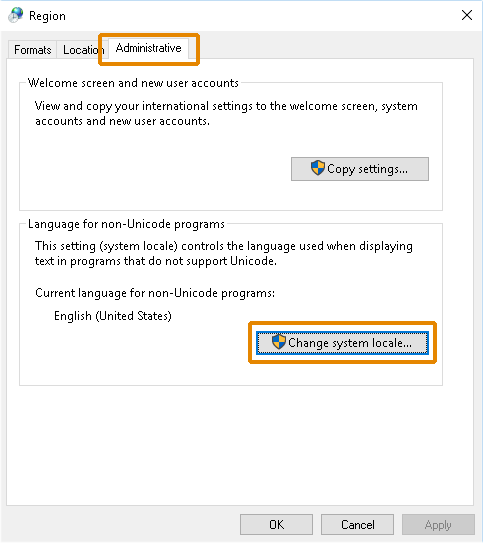
- Click the Change system locale… button in the Administrative tab (rightmost tab).
- On Region Settings window, click the drop-down list for Current system locale.
- Find and select Japanese (Japan).
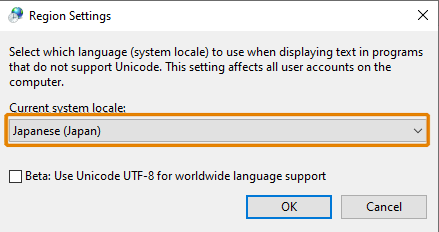
* If there is a check in a check-box here talking about (Beta) UTF-8 / Unicode, then please remove the check. - Click OK and confirm changes. Restart PC so that the update takes effect.
- Press the Windows key, type ‘settings’ and open Settings.
- Click on Time & Language, then on Region & language.
- Under Languages, click the Add a Language button.
- Find and click on Japanese in the list, then on Next.
- On Install language features, please untick unrequired features. We recommend unticking Set as my Windows display language.
- Click Install.
- Press the Windows key, type ‘control panel’ and open the Control Panel.
- Click on Add a Language under Clock, Language, and Region.
- Click on Add a Language on the Language window.
- Find and click on Japanese in the list.
- On the Language window, click on the Options button to download and install the Japanese language pack.
( OPTION 3 ) How can I set Windows 7 to Japan/Japanese?
- Click on Start then Control Panel.
- Click on Clock, Language, and Region, then on Regional and Language Options.
- Click the Change system locale… button in the Administrative tab (rightmost tab).
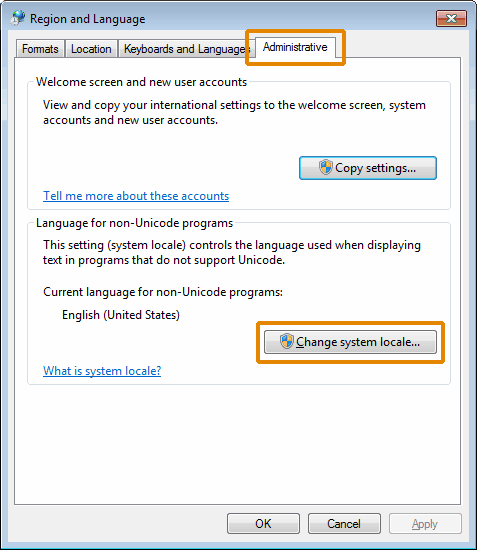
- Find and select Japanese (Japan).
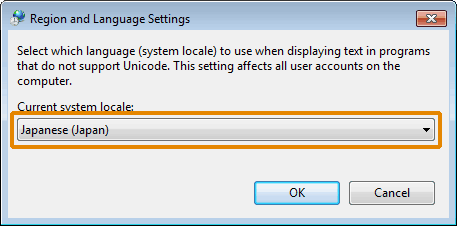
- Click OK and confirm changes. Restart PC so that the update takes effect.
If Japanese was not in the drop-down list, please follow these instructions:
- Click on Start then Control Panel.
- Find Windows Update and select Check for Updates.
- Find Japanese Language Pack in available optional updates.
- Install the language pack. Log off Windows then log on again so that the update takes effect.
( OPTION 4 ) How can I set Windows XP to Japan/Japanese?
- Click on Start, Settings then Control Panel.
- Click on Language, and Regional Options.
- Click the Regional Option tab, and then select Japanese from the drop-down menu to install.
- Click Advanced tab, and then select Japanese from the drop-down menu.
- Click OK and confirm changes. Restart PC so that the update takes effect.
Check all Japanese-related codes on the Advanced tab in Language, and Regional Options, or those may not be default on your OS. The main codes for Japanese is as following:
- MAC – Japanese
- Japanese Katakana Extended
- JIS X 0208-1990&0212-1990
(OPTION 5) Change Regional Format
(Commonly used as a means of region restriction. This alone can often resolve something intentional.)
* Press the Windows Button (for the start menu)
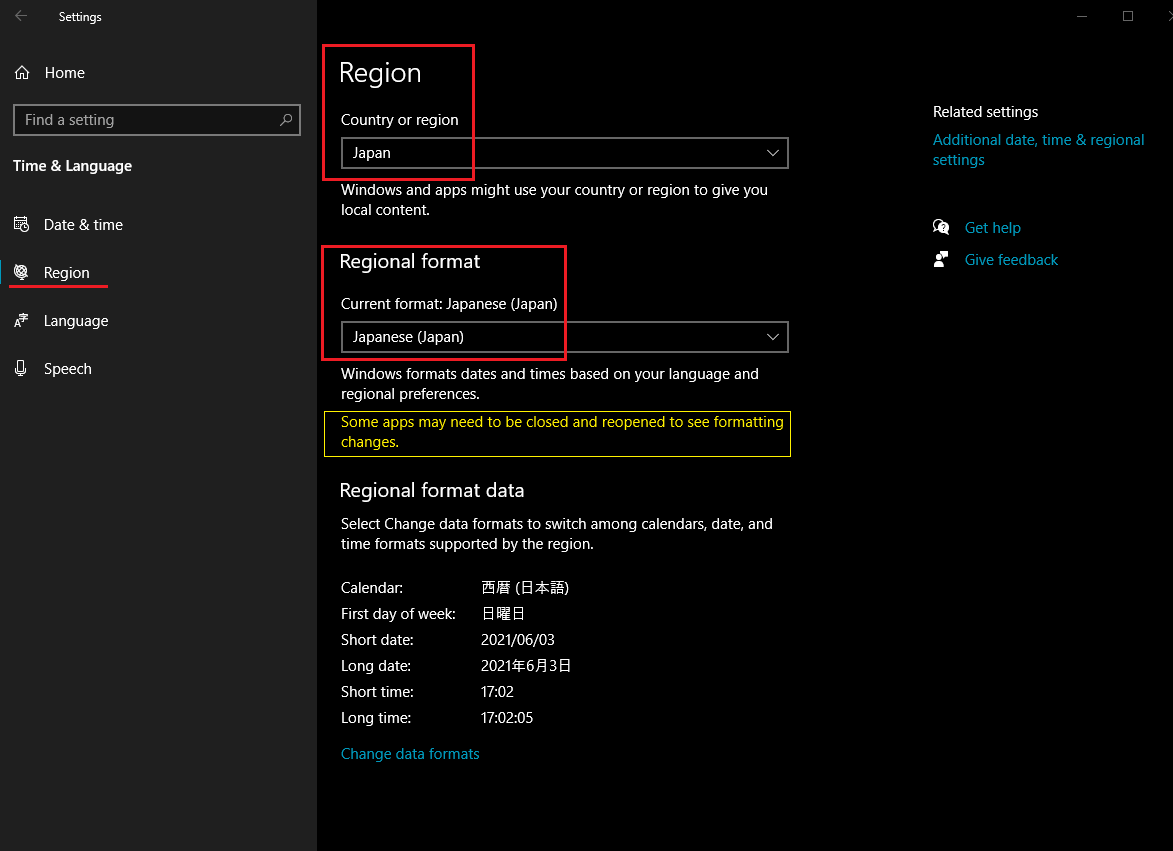
Settings (Cog Icon) > Time and Language > Region (on the left)
In the “Region” window, set “country or region” to Japan, and “regional format” to Japanese.
Change Timezone (While this is rare, it is also much simpler to do than the next step.)
* Press the Windows Button (for the start menu)
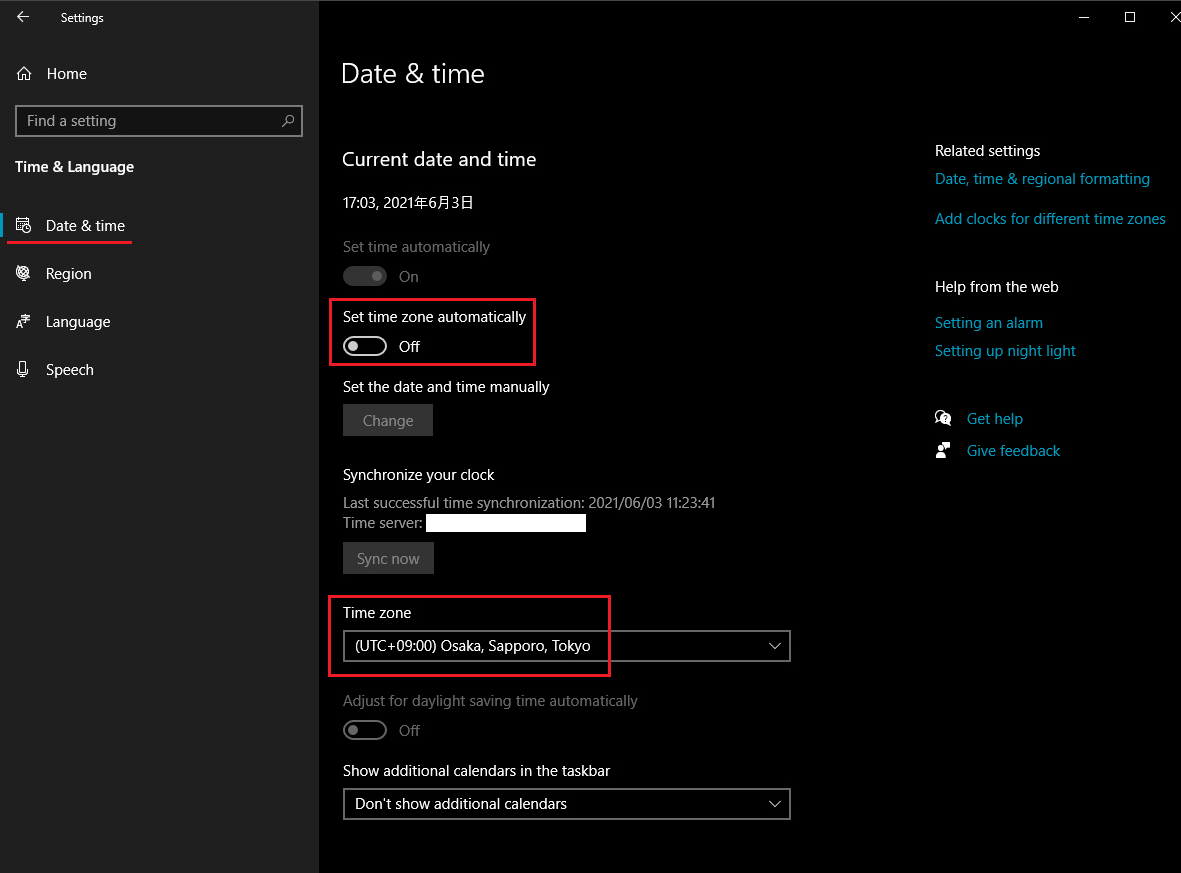
Settings (Cog Icon) > Time and Language > Date & time (on the left)
In the “Date & time” window, set “Time Zone” to Japan (GMT+09:00) Osaka, Sapporo, Tokyo.
(OPTION 6) Change Display Language
(Your Windows 10 interface will become Japanese, so turning it back to another language will require that you either know your way around the operating system well, or understand some Japanese.)
* Press the Windows Button (for the start menu)
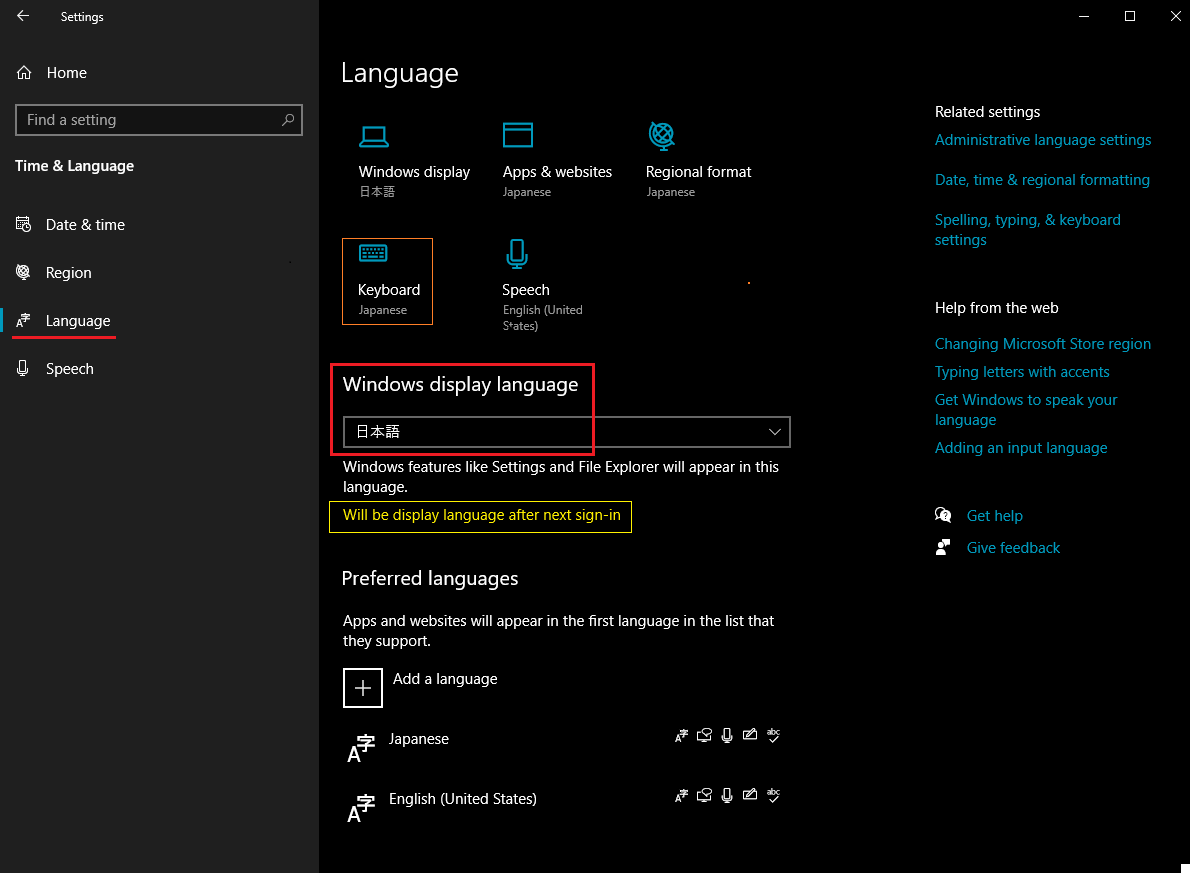
Settings (Cog Icon) > Time and Language > Language (on the left)
Under “Windows display language,” Select Japanese from the list of languages available.
* If Japanese is not available, you will need to “Add a language” (click the + plus icon) below and select 日本語 (Japanese). This will likely result in the installation of a Japanese language pack too, and allow for Japanese keyboard layout / input.
( OPTION 7 ) Change Keyboard
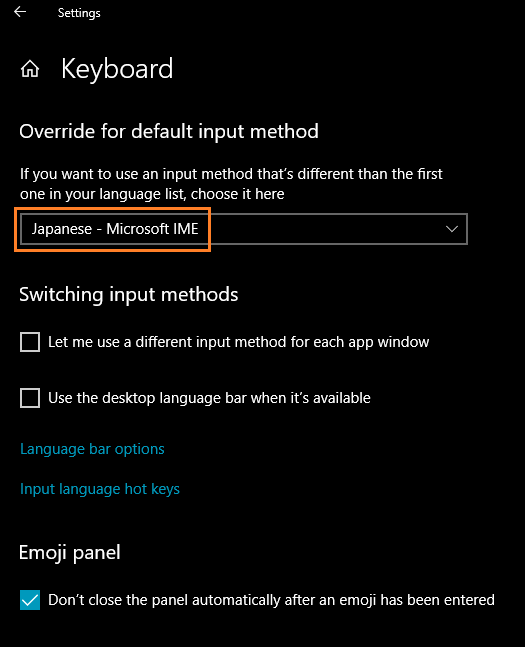
While it is very very rare that a game will require Japanese keyboard layout active, if you must, you can change the keyboard layout to Japanese, via the “Keyboard” menu. The button for which is found in the same “Language” window as above. Select “Japanese (Microsoft IME)”
* Finally, please make sure to RESTART your PC after you have made these changes.
Mount mdf/iso Using Daemon Tools
i’d prefer using Daemon Tools than Poweriso. but well, in some cases daemon tools sometimes does not work on specific vn. Here’s how to mount with daemon Tools.

How to use AlpharomDiE

FAQ
Q: WHAT IS THE PASSWORD ?A: ryuugames.com and ryuublogger.com
Q: WHERE IS THE CRACK?A: Sometimes we do not include a crack, so you can ask on our discord server
Q: THE RAR IS CORRUPTEDA: This is extremely rare case. if you met the problem, please ask on our discord server
Q: HOW DO I SEARCH VN HERE?A :there’s already search button on the top header. use that.
Q: IS THIS VN TRANSLATED?A: Please guys, just check the vndb.org in the info section, you can see is it being translated or not.
Q: I CAN’T RUN THE GAME/THE GAME IS CRASHING.A: Please describe your problem and attach your screenshot in comment section and make sure you already changed your System Locale, Region, Time and Language to Japan.
Q: CAN WE PLAY XX VN ON ANDROID ?A : please go to Tutorial section, or you can search in the keyword “Tutorial Kirikiroid2”
Q: HOW DO I SEARCH DEVELOPER VN HERE?A : Just type in the search box and that’s what you’re looking for.Ex : you type atelier sakura in search box then some VN’s from atelier will appear.
Q: WHY I CAN’T SEARCH WHAT I LOOKING FOR?A : In some cases, you will not find or getting not found in search engine. that’s why i suggest to search it with Japanese Title.example : きっとぜんぶ私のせい

